You open Snapchat, see a Story that actually matters, and think “i’ll save this later.” Twenty-four hours later it’s gone. That is still the reality in July 2026.
Regular Stories disappear after 24 hours. Spotlight videos can stay longer, but creators delete them all the time. If you want to keep something like a memory, a funny moment, a piece of content for work, you need to grab it while the link is still live.
5 Best Free Ways to Archive Snapchat Content Before It Disappears
This guide covers only free methods that actually work right now. No paid apps, no complicated software, and nothing that requires your Snapchat password.

Why Snapchat Content Disappears So Fast
Snapchat was built around temporary content. Stories (My Story and most shared Stories) expire 24 hours after they are posted. The timer starts the moment each Snap is added. After that window closes, the content is removed from feeds and eventually deleted from Snapchat’s servers.
Spotlight is different. Public Spotlight videos can stay up for weeks or months until the creator removes them. But once they are gone, they are gone.
If the Story or Spotlight is public and you still have the link, you can usually save it. Private content is a different story, no free tool can access that.
Method 1: Save Your Own Content the Official Way
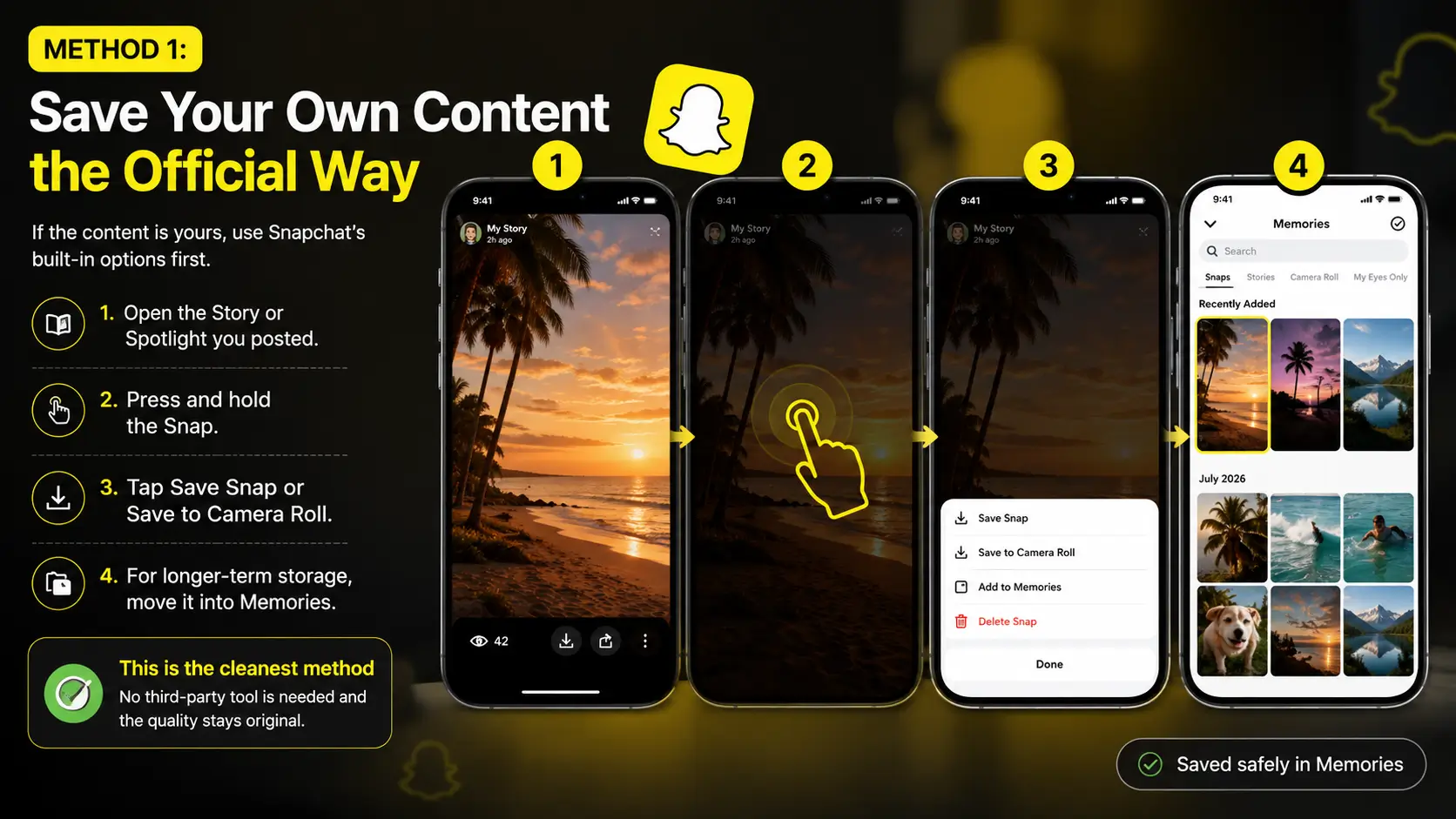
If the content is yours, use Snapchat’s built-in options first.
- Open the Story or Spotlight you posted.
- Press and hold the Snap.
- Tap Save Snap or Save to Camera Roll.
- For longer-term storage, move it into Memories.
This is the cleanest method for your own posts. No third-party tool is needed and the quality stays original.
Method 2: Use a Free Online Downloader (Easiest for Most People)
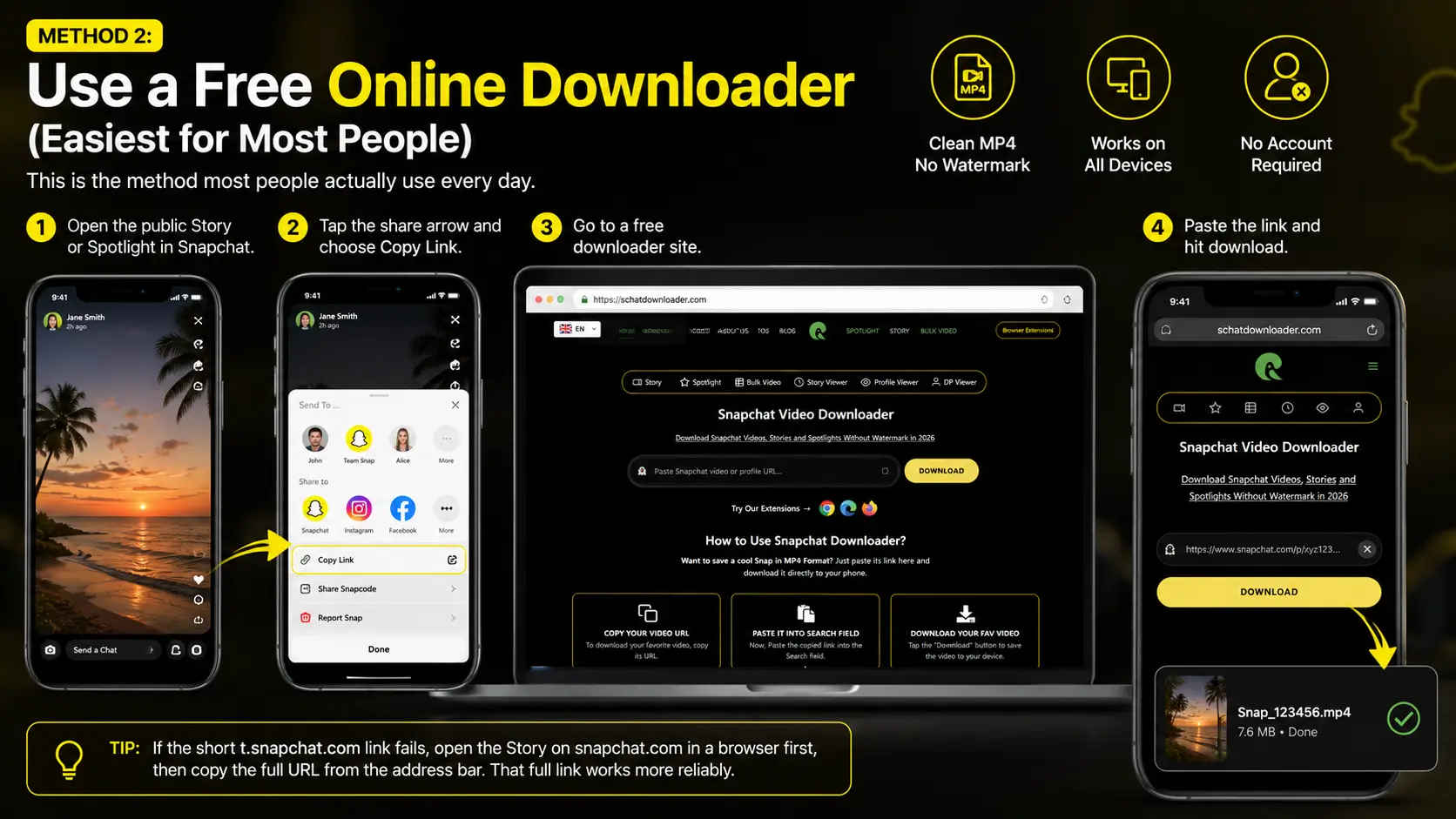
This is the method most people actually use every day.
- Open the public Story or Spotlight in Snapchat.
- Tap the share arrow and choose Copy Link.
- Go to a free downloader site.
- Paste the link and hit download.
On SchatDownloader you can do this for both Stories and Spotlights:
- For Stories → Snapchat Story Downloader
- For Spotlight videos → Snapchat Spotlight Downloader
- General video links → Snapchat Video Downloader
The file usually comes as a clean MP4 with no watermark. It works on iPhone, Android, and computer browsers. No account is required.
Tip: If the short t.snapchat.com link fails, open the Story on snapchat.com in a browser first, then copy the full URL from the address bar. That full link works more reliably.
Method 3: Bulk Download Multiple Stories or Spotlights at Once
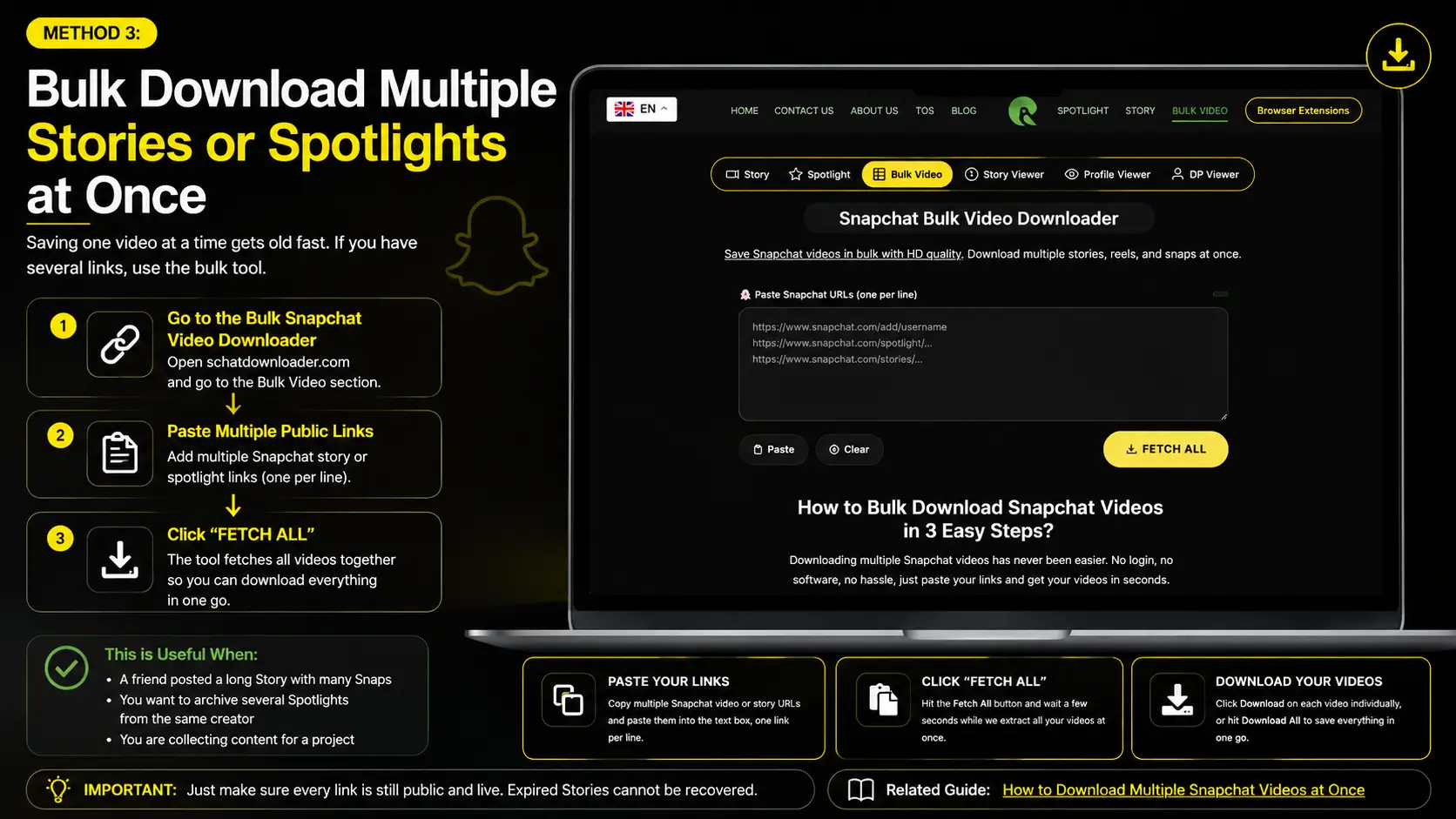
Saving one video at a time gets old fast. If you have several links, use the bulk tool.
Go to the Bulk Snapchat Video Downloader. Paste multiple public links (one per line). The tool fetches them together so you can download everything in one go.
This is useful when:
- A friend posted a long Story with many Snaps
- You want to archive several Spotlights from the same creator
- You are collecting content for a project
Just make sure every link is still public and live. Expired Stories cannot be recovered.
You can also check the related guide: How to Download Multiple Snapchat Videos at Once.
Method 4: One-Click Browser Extension
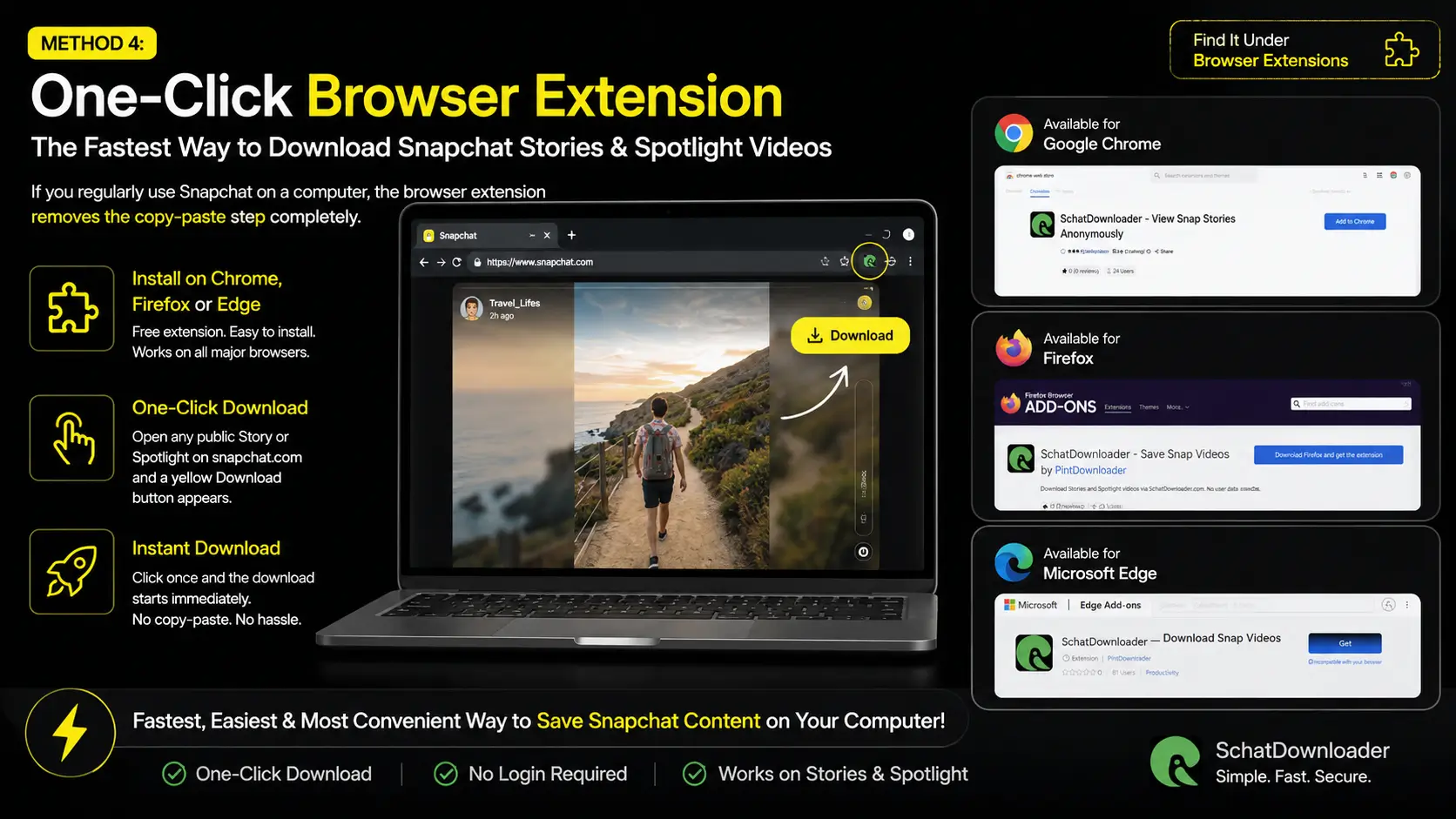
If you regularly use Snapchat on a computer, the browser extension removes the copy-paste step completely.
Install the free SchatDownloader extension for Chrome, Firefox, or Edge. When you open a public Story or Spotlight on snapchat.com, a yellow Download button appears on the player. One click and the download starts.
It is the fastest method once set up. You can find the extension pages linked from the main site under browser extensions.
Method 5: Screen Recording (When Nothing Else Works)
Sometimes the link is private or the online tools fail. In that case screen recording is the only free option left.
On iPhone Use the built-in Screen Recording from Control Center. Open the Story, start recording, and stop when it ends. Trim the video later in Photos.
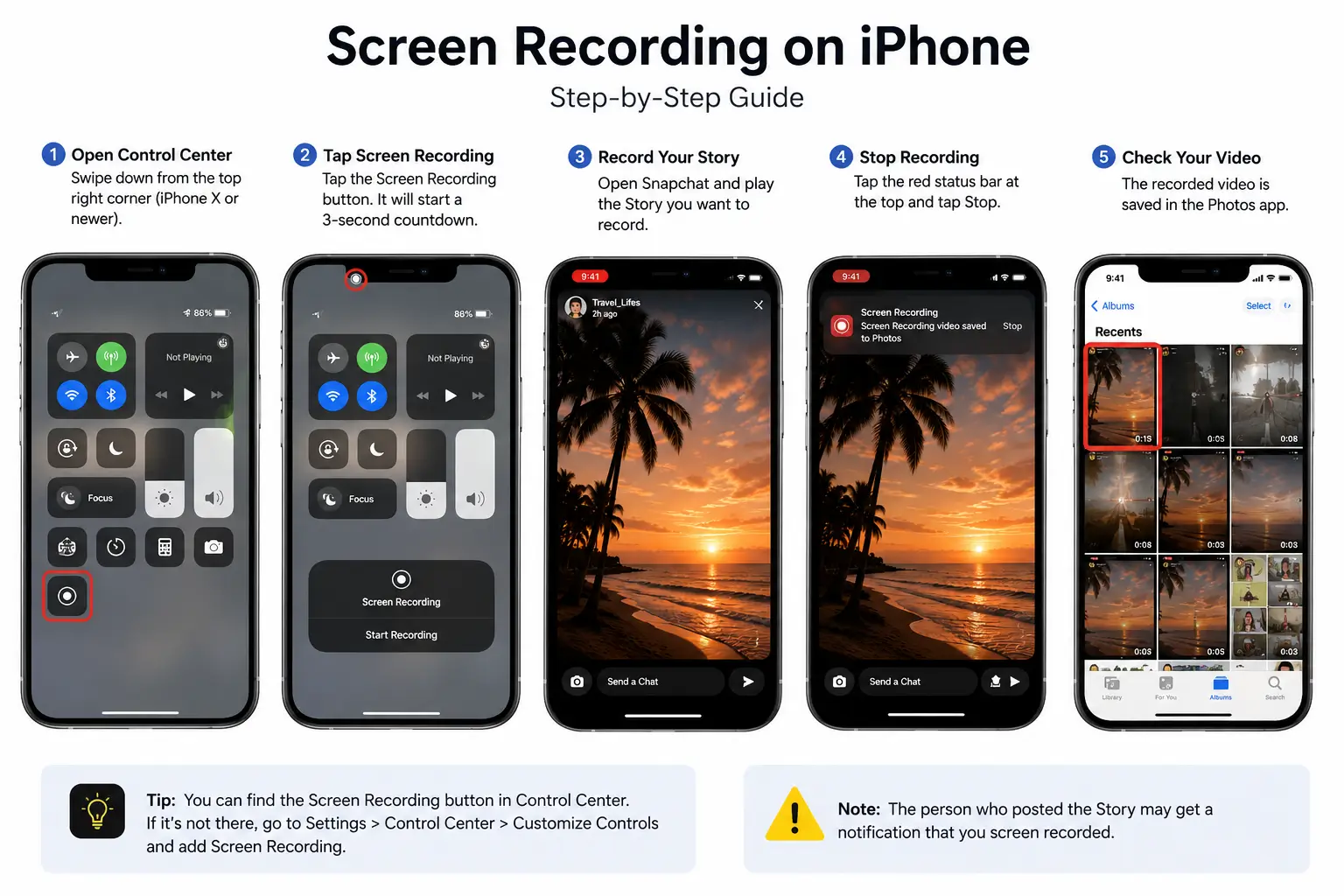
On Android Most phones have a built-in screen recorder in the quick settings. Same process.
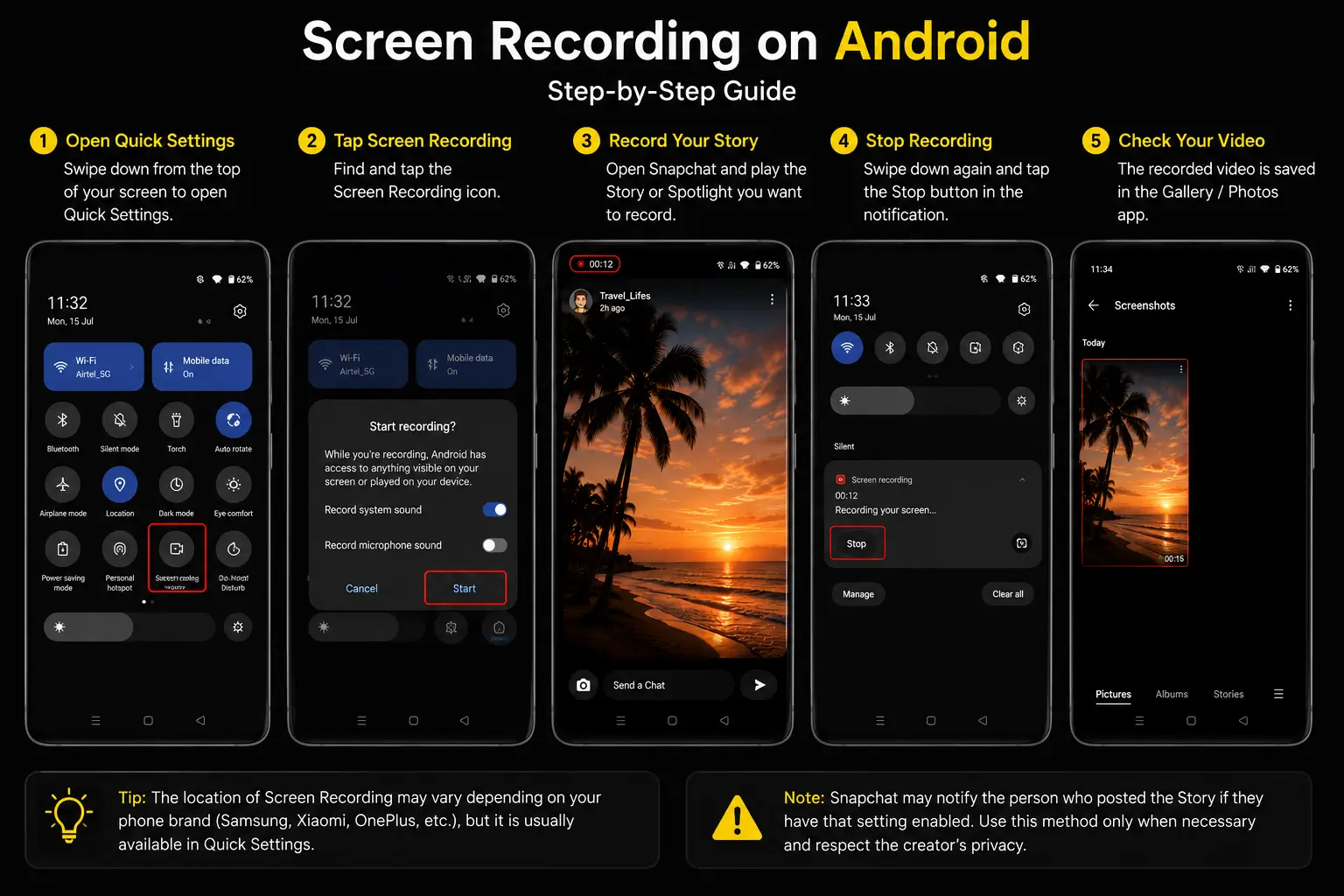
Quality is lower than a direct download and you will capture the UI elements unless you are careful. Snapchat also shows a notification to the poster if they have that setting enabled, so use this only when necessary.
There is a longer guide on recording without notification if you need it: Snapchat Screen Record Trick.
Quick Comparison Table
| Method | Speed | Quality | Works on Mobile | Best For | Free |
|---|---|---|---|---|---|
| Official Save (own content) | Instant | Original | Yes | Your own posts | Yes |
| Online Downloader | Very fast | Original HD | Yes | Single Stories & Spotlights | Yes |
| Bulk Downloader | Fast | Original HD | Yes | Multiple links at once | Yes |
| Browser Extension | Fastest | Original HD | No (desktop) | Frequent computer users | Yes |
| Screen Recording | Medium | Lower | Yes | Last resort / private content | Yes |
Important Limits You Should Know
- Private Stories and locked accounts cannot be downloaded by any free online tool.
- Once a Story fully expires (usually after 24 hours), the file is gone. Do not wait.
- Always respect the creator. These methods are meant for personal backup or content you have permission to keep.
- Snapchat changes things from time to time. If a method stops working, check the Snapchat Downloader Not Working guide for current fixes.
Frequently Asked Questions
Can I download a Story after 24 hours? Usually no. Once it is fully expired and removed from Snapchat’s servers, free tools cannot bring it back.
Does the creator get a notification when I download? With the online downloaders and the extension, no. Screen recording can trigger a notification depending on the poster’s settings.
Is bulk download safe? Yes, as long as you only paste public links. The tool does not ask for your login details.
What about Highlights or Saved Stories? Public Highlights that stay on a profile can often still be downloaded the same way as long as the link works.
Final Thoughts
The simplest free workflow most people use in 2026 looks like this:
- Copy the public link while the content is still live.
- Paste it into the Story Downloader or Spotlight Downloader.
- For multiple links, switch to the Bulk tool.
- Keep the files in a folder on your phone or computer.
Do it the same day you see something worth keeping. Snapchat will not wait for you.
If a method stops working after a Snapchat update, the troubleshooting guide on the site is usually updated quickly. Bookmark the main tools and you will always have a free way to archive public content before it disappears.